ConstraintLayout chain은 버튼 여러 개를 한 줄에 정렬하거나, 여러 요소를 일정한 규칙으로 배치할 때 자주 만나는 개념입니다. 그런데 막상 쓰려고 하면 체인이 왜 안 잡히는지, spread, spread_inside, packed가 어떻게 다른지, 왜 packed가 기대한 것처럼 안 보이는지에서 자주 막히게 됩니다.
이번 글에서는 ConstraintLayout chain이 무엇인지부터, 각 chain style 차이와 실제 화면에서 언제 어떤 정렬을 써야 하는지 쉽게 정리하겠습니다. 핵심은 style 이름을 외우는 것이 아니라 어떤 연결 구조와 어떤 배치 결과를 기대하는지 이해하는 것입니다.
먼저 한 줄로 정리
- chain은 style보다 연결 구조가 먼저
- spread는 가장 기본적인 고른 분배
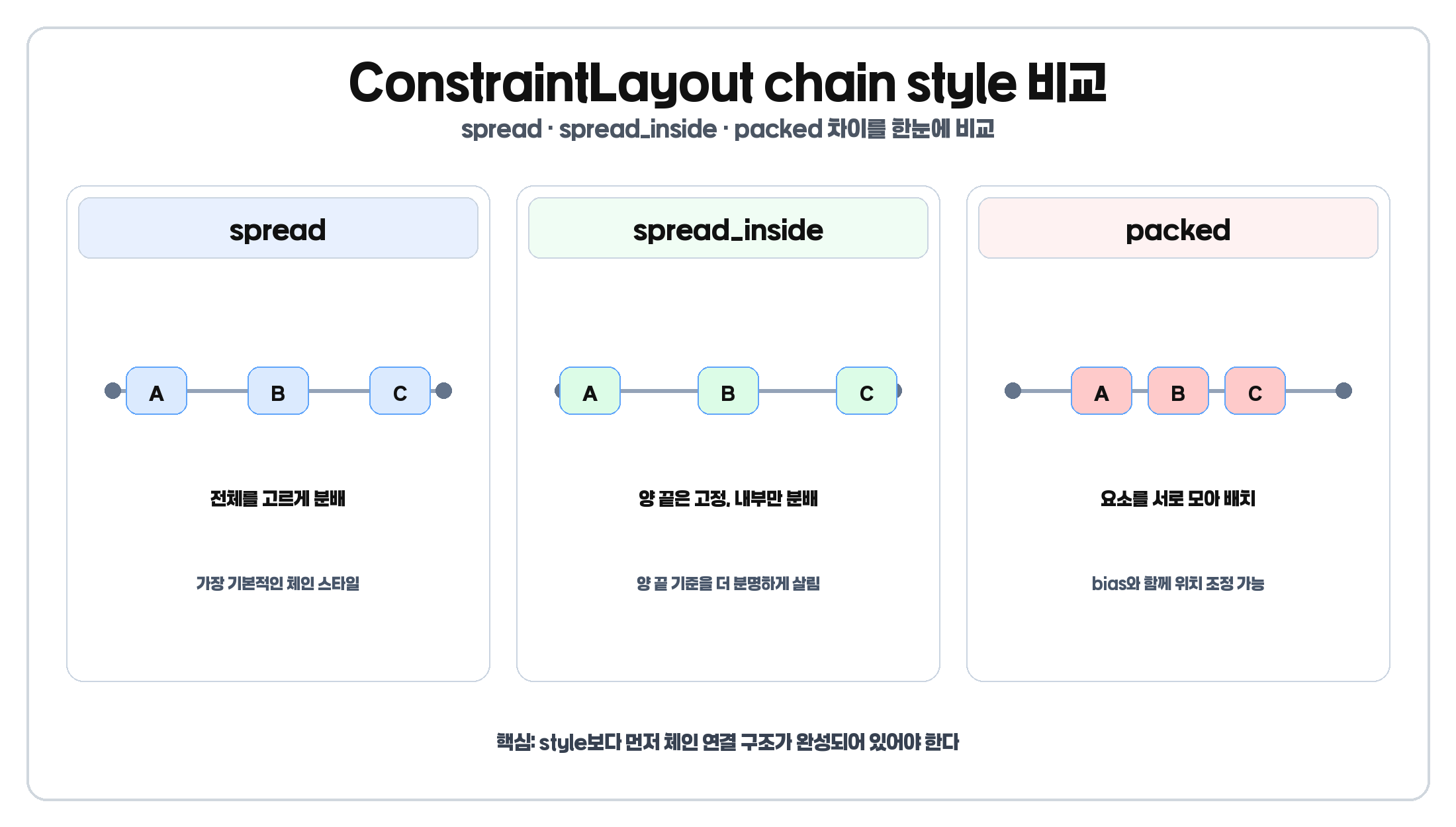
- spread_inside는 양 끝 요소를 양 끝에 붙이고 내부 요소를 나눔
- packed는 요소들을 서로 모아서 배치
- packed는 bias와 함께 위치를 조정할 수 있음
- 체인 안에 0dp 요소가 들어가면 남는 공간 분배 방식까지 같이 봐야 함
체인이 안 되면 style보다 먼저 연결 구조를 보고, style을 고를 때는 화면에서 어떤 배치 결과를 원하는지 먼저 생각해야 합니다.
ConstraintLayout chain이 무엇인가
Android 공식 가이드 기준으로 chain은 양방향 제약으로 연결된 뷰 그룹입니다. 즉, 단순히 뷰를 나란히 두는 것이 아니라 서로를 기준으로 연결해서 하나의 정렬 그룹처럼 다루는 방식입니다. chain은 가로와 세로 방향 모두 만들 수 있지만, 이번 글에서는 이해하기 쉬운 가로 체인 기준으로 설명하겠습니다. 세로 체인도 원리는 같습니다.
기본 구조 예시
<Button
    android:id="@+id/btn1"
    android:layout_width="wrap_content"
    android:layout_height="wrap_content"
    android:text="A"
    app:layout_constraintStart_toStartOf="parent"
    app:layout_constraintEnd_toStartOf="@id/btn2"
    app:layout_constraintTop_toTopOf="parent" />

<Button
    android:id="@+id/btn2"
    android:layout_width="wrap_content"
    android:layout_height="wrap_content"
    android:text="B"
    app:layout_constraintStart_toEndOf="@id/btn1"
    app:layout_constraintEnd_toStartOf="@id/btn3"
    app:layout_constraintTop_toTopOf="parent" />

<Button
    android:id="@+id/btn3"
    android:layout_width="wrap_content"
    android:layout_height="wrap_content"
    android:text="C"
    app:layout_constraintStart_toEndOf="@id/btn2"
    app:layout_constraintEnd_toEndOf="parent"
app:layout_constraintTop_toTopOf="parent" />이 구조가 중요한 이유는 chain이 style 속성 하나로 생기는 기능이 아니라 양방향 연결 구조가 먼저 완성되어야 의미가 생기는 기능이기 때문입니다.
체인이 안 만들어지는 가장 흔한 이유
체인이 기대대로 안 보이는 가장 흔한 이유는 style을 잘못 준 것보다, 체인 구조 자체가 덜 잡혀 있기 때문입니다.
실패 예시
<Button
android:id="@+id/btn1"
android:layout_width="wrap_content"
android:layout_height="wrap_content"
android:text="A"
app:layout_constraintStart_toStartOf="parent"
app:layout_constraintTop_toTopOf="parent" />
<Button
android:id="@+id/btn2"
android:layout_width="wrap_content"
android:layout_height="wrap_content"
android:text="B"
app:layout_constraintStart_toEndOf="@id/btn1"
app:layout_constraintTop_toTopOf="parent" />
<Button
android:id="@+id/btn3"
android:layout_width="wrap_content"
android:layout_height="wrap_content"
android:text="C"
app:layout_constraintStart_toEndOf="@id/btn2"
app:layout_constraintTop_toTopOf="parent" />이건 버튼이 오른쪽으로 이어 붙은 것처럼 보일 수는 있어도, 공식 가이드가 말하는 양방향 chain 구조와는 다릅니다.
수정 예시
<Button
    android:id="@+id/btn1"
    android:layout_width="wrap_content"
    android:layout_height="wrap_content"
    android:text="A"
    app:layout_constraintStart_toStartOf="parent"
    app:layout_constraintEnd_toStartOf="@id/btn2"
    app:layout_constraintTop_toTopOf="parent" />

<Button
    android:id="@+id/btn2"
    android:layout_width="wrap_content"
    android:layout_height="wrap_content"
    android:text="B"
    app:layout_constraintStart_toEndOf="@id/btn1"
    app:layout_constraintEnd_toStartOf="@id/btn3"
    app:layout_constraintTop_toTopOf="parent" />

<Button
    android:id="@+id/btn3"
    android:layout_width="wrap_content"
    android:layout_height="wrap_content"
    android:text="C"
    app:layout_constraintStart_toEndOf="@id/btn2"
    app:layout_constraintEnd_toEndOf="parent"
app:layout_constraintTop_toTopOf="parent" />체크 포인트
- 첫 번째 요소가 부모와 연결되어 있는가
- 마지막 요소가 부모와 연결되어 있는가
- 중간 요소가 양방향으로 연결되어 있는가
- style을 보기 전에 구조가 체인 형태로 완성되어 있는가
chain head는 왜 중요한가
공식 문서 기준으로 chain style은 체인의 head view 속성으로 설명됩니다. 가로 체인에서는 보통 가장 왼쪽 요소, 세로 체인에서는 가장 위쪽 요소를 먼저 떠올리면 됩니다. 즉, style이 체인 전체에 적용되는 것처럼 보여도 XML에서는 보통 첫 요소 쪽 속성으로 읽히는 구조라고 생각하면 됩니다.
spread는 언제 쓰면 좋을까
spread는 공식 문서 기준으로 가장 기본적인 chain style입니다. 마진을 고려한 뒤 요소들을 남은 공간 안에서 고르게 분배합니다. 즉, 특별한 의도가 없으면 가장 먼저 떠올릴 수 있는 기본값입니다.
spread가 잘 맞는 경우
- 버튼 여러 개를 균등하게 정렬하고 싶을 때
- 설정 화면에서 필터 버튼을 고르게 배치하고 싶을 때
- 양 끝에 너무 붙이지 않고 전체를 균형 있게 나누고 싶을 때
예시
<Button
    android:id="@+id/btn1"
    android:layout_width="wrap_content"
    android:layout_height="wrap_content"
    android:text="A"
    app:layout_constraintHorizontal_chainStyle="spread"
    app:layout_constraintStart_toStartOf="parent"
app:layout_constraintEnd_toStartOf="@id/btn2" />실제로는 chain의 head view에 style을 주게 됩니다. 즉, 체인의 첫 번째 요소 쪽에서 style을 읽는 구조라고 생각하면 XML을 이해하기 쉽습니다.
spread_inside는 언제 다를까
spread_inside는 양 끝 요소는 양 끝 제약에 붙어 있고, 가운데 요소들만 내부에서 분배되는 스타일입니다. 즉, spread보다 양 끝 기준이 더 분명합니다.
spread_inside가 잘 맞는 경우
- 첫 버튼은 왼쪽 끝, 마지막 버튼은 오른쪽 끝에 두고 싶을 때
- 가운데 요소만 적당히 나눠 보이게 하고 싶을 때
- 양쪽 끝 기준을 살리고 싶은 화면
체감 차이로 보면 spread는 전체가 고르게 퍼지는 느낌이고, spread_inside는 양 끝은 고정되고 내부만 나뉘는 느낌입니다.
packed는 언제 가장 유용할까
packed는 공식 문서 기준으로 요소들을 서로 모아서 배치하는 스타일입니다. 많은 사람이 packed를 그냥 가운데 정렬이라고 오해하지만, 핵심은 요소를 모아 둔다는 점이고 그 묶음 전체 위치는 bias와 함께 조정할 수 있습니다.
packed가 잘 맞는 경우
- 버튼 그룹을 하나의 묶음처럼 보여주고 싶을 때
- 가운데 정렬된 작은 액션 그룹이 필요할 때
- 여러 요소를 퍼뜨리기보다 한 덩어리처럼 보이게 하고 싶을 때
예시
<Button
    android:id="@+id/btn1"
    android:layout_width="wrap_content"
    android:layout_height="wrap_content"
    android:text="A"
    app:layout_constraintHorizontal_chainStyle="packed"
    app:layout_constraintHorizontal_bias="0.3"
    app:layout_constraintStart_toStartOf="parent"
app:layout_constraintEnd_toStartOf="@id/btn2" />이 경우 packed된 버튼 그룹 전체를 조금 더 start 쪽으로 치우치게 둘 수 있습니다. 즉, packed는 단순히 가운데가 아니라 묶어서 배치한 뒤 bias로 위치를 조정할 수 있는 스타일입니다.
margin이 들어가면 왜 체감이 달라질까
공식 문서 기준으로 chain에서는 margin도 분배 계산에 함께 반영됩니다. 즉, margin만큼 공간이 먼저 빠진 뒤 남은 영역 안에서 분배된다고 보는 편이 맞습니다. 그래서 같은 spread라도 margin이 크면 전체가 덜 퍼져 보일 수 있고, packed에서도 margin 때문에 묶음이 생각보다 넓어 보일 수 있습니다.
0dp가 들어간 체인은 왜 또 다르게 보일까
ConstraintLayout API 문서에는 spread 또는 spread_inside 체인에서 일부 요소가 MATCH_CONSTRAINT일 때 남는 공간을 나눠 쓸 수 있다고 설명합니다. 실무에서는 이걸 보통 0dp 요소가 섞였을 때 체감하게 됩니다. 즉, wrap_content 체인과 0dp 체인은 결과가 같지 않을 수 있습니다. 체인에서 0dp를 쓸 때는 단순 정렬만이 아니라 남는 공간 분배까지 같이 생각해야 합니다.
언제 어떤 chain style을 선택하면 될까
spread를 먼저 떠올리면 좋은 경우
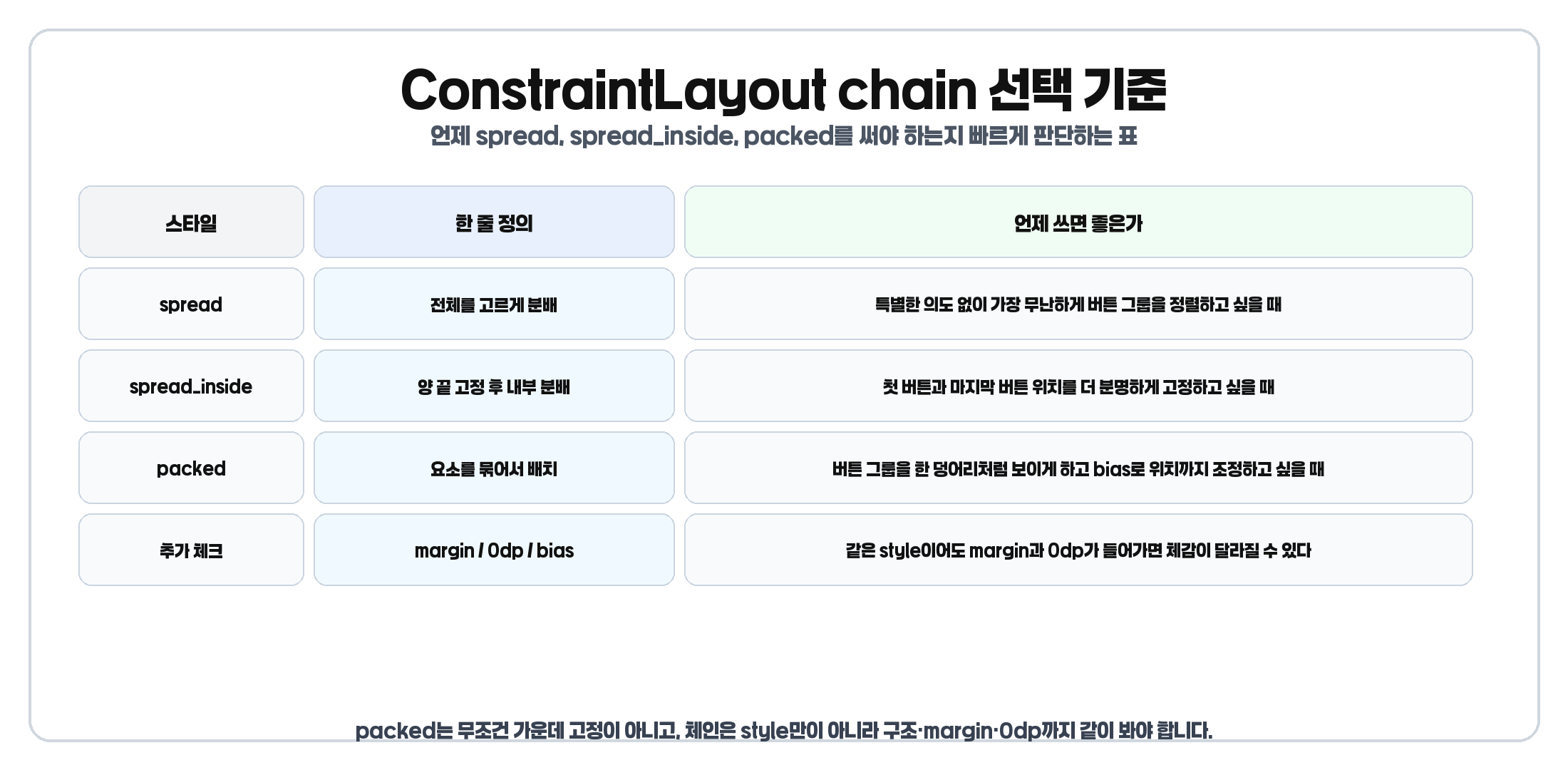
- 특별한 의도 없이 고르게 나누고 싶을 때
- 가장 무난한 기본 정렬이 필요할 때
- wrap_content 요소를 고르게 보여주고 싶을 때
spread_inside가 더 맞는 경우
- 양 끝 요소를 더 분명하게 끝에 붙이고 싶을 때
- 가운데 요소만 내부 분배하면 되는 경우
- 양끝 정렬 감각을 더 살리고 싶을 때
packed가 더 맞는 경우
- 버튼이나 액션 그룹을 한 덩어리처럼 보여주고 싶을 때
- 요소를 퍼뜨리기보다 모아두는 게 더 자연스러울 때
- bias와 함께 그룹 위치를 조정하고 싶을 때
즉, 기본 분배는 spread, 양 끝 고정은 spread_inside, 묶어 배치는 packed로 기억하면 실전에서 훨씬 덜 헷갈립니다.
자주 하는 실수
- style만 바꾸고 구조를 안 보는 실수
- packed를 무조건 가운데 정렬로 보는 실수
- head view 개념을 놓치는 실수
- margin과 0dp를 빼고 chain을 이해하는 실수
체인이 안 되는 이유는 style보다 구조 문제일 가능성이 큽니다. 그리고 packed는 bias와 함께 보면 꼭 정중앙 고정은 아닙니다. 또 chain은 style 이름만이 아니라 구조, margin, 0dp까지 함께 봐야 실제 화면을 정확히 읽을 수 있습니다.
한 번에 정리
- chain은 양방향 연결 구조가 먼저다
- spread는 기본 분배다
- spread_inside는 양 끝 고정 후 내부 분배다
- packed는 요소를 모아 배치하는 방식이다
- packed는 bias와 함께 보면 더 정확하다
- margin과 0dp가 들어가면 체감이 달라질 수 있다
- 세로 체인도 원리는 같다
즉, ConstraintLayout chain은 style 이름보다 화면에서 어떤 배치 결과를 원하느냐를 먼저 생각해야 이해가 쉽습니다.
마무리
ConstraintLayout chain은 처음 보면 style 이름만 많아 보여서 복잡해 보일 수 있습니다. 하지만 구조를 먼저 잡고, 그 다음 원하는 배치 방식에 따라 spread, spread_inside, packed를 고르면 생각보다 훨씬 단순하게 정리됩니다. 특히 버튼 그룹이나 정렬 규칙이 있는 UI를 자주 다룬다면, chain 개념을 정확히 이해하는 것만으로도 레이아웃 유지보수가 훨씬 쉬워집니다.
관련해서 ConstraintLayout 전체 개념을 먼저 정리하고 싶다면 안드로이드 ConstraintLayout 완전 정리, ConstraintLayout 디버깅 가이드, guideline과 barrier 차이 글을 함께 읽어보면 좋습니다. 공식 기준은 Android Developers ConstraintLayout 가이드, ConstraintLayout API reference, ConstraintSet API reference를 참고하면 됩니다.


